


Cincinnati.com: The Enquirer
2.6258.00 Reviews
App Specs
- Version
- 8.10.3
- Updated On
- License
- Free
- Downloads
- 50,000+
- Developer
- USA TODAY Co.
- Categories
- News & Magazines
- Platform
- Android
Screenshots




 Analysis by AppCompare
Ever find yourself wanting to keep up with all things Cincinnati but with a little more ease? Well, let me introduce you to Cincinnati.com: The Enquirer. This app is like having a little slice of the Queen City right in your pocket. As someone who's spent a good chunk of time exploring local news apps, I found this one to be a real gem for staying in the loop with the latest happenings in Cincinnati.
What the First Week Feels Like
The early appeal is easy to understand: opening one local news app can feel more convenient than checking separate sources for city news, sports, weather, and entertainment. The Enquirer’s Cincinnati focus gives the home screen a clear purpose, especially if the city is where you live, work, or spend time with family. I would use it as a quick morning scan, then return when a developing local story affects the day.
It is also useful for people who have moved away but still care about what is happening around Cincinnati. A local report can offer context that a national news feed may skip, while sports and community coverage make the app relevant beyond major breaking events. That focused scope is its main advantage, but it also sets a boundary: readers looking for a broad national or international briefing will still need another source.
Getting Started with the App
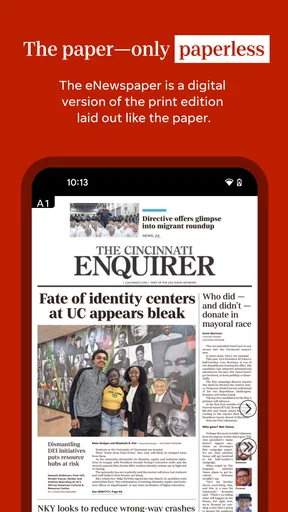
First things first, downloading the app is a breeze. Cincinnati.com: The Enquirer is a free news and magazines app from USA TODAY Co., with a minimum OS requirement of 8.0. Once installed, the clean and straightforward interface greets you. No clutter, just a neat menu that makes navigation as smooth as a freshly paved road.
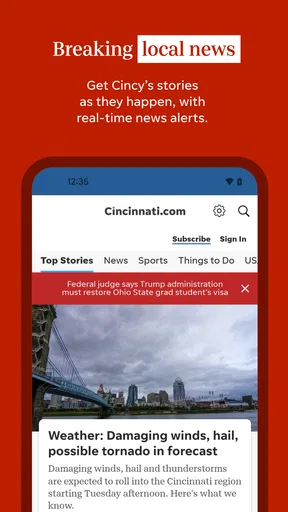
The app kicks off with a home screen that showcases the top stories of the day. And let me tell you, it’s not just the big headlines. You get a good mix of breaking news, sports updates, and local events. Honestly, it’s like having the pulse of Cincinnati right at your fingertips.
Making It Part of a Routine
For lasting value, a local news app has to earn more than a place on the phone during a big story. I’d make this one part of a small routine rather than leave it open all day: scan the leading stories with breakfast, check sports or weather when those topics matter, and revisit local coverage if something affects my commute or plans. That approach makes the focused coverage useful without turning every notification or headline into another demand for attention.
A realistic use case is planning a weekend in the city. I would look through local culture and event coverage before deciding what to do, then share a promising article with the person I’m meeting. For a weekday, the same habit can be more practical: check what is happening locally before leaving home, rather than relying only on a general national feed. The app is best when Cincinnati itself is the subject, not when I expect it to replace every news source I use.
Worth Reading Before You Choose

EA SPORTS FC Mobile 26 Is a Bigger Football Game, but It Takes Time

Flipboard Shows What News Apps Must Do Beyond the Feed

Switching to Android Auto Means Rethinking Your Driving Routine

Google Calendar Makes a Crowded Week Easier to Manage

Ludo King Makes the Most of the Minutes Between Plans

Baby Panda World Brings Quick Play to Modern Phones, but Its Game Library Feels Busy
Features that Shine
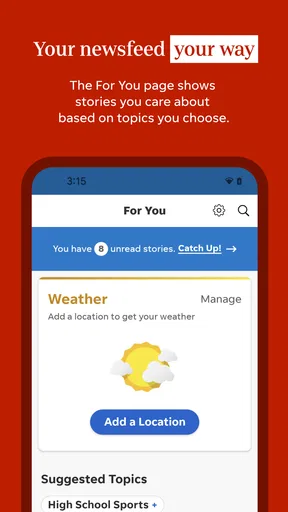
One of my favorite features is the customizable alert system. You can choose which kinds of notifications you want to receive, whether it's breaking news or sports scores. This is super handy if you’re like me and prefer to stay informed without being overwhelmed. The app respects your preferences, letting you control the flow of information.
That control matters over time. I’d start with only the alerts I genuinely need, then adjust them after a week instead of enabling every option immediately. If sports updates are the reason you installed the app, keep those and silence categories that rarely change your plans. The useful test is whether a notification gives you something actionable or important; if it only interrupts, switching it off makes the app easier to keep.
The section dedicated to local culture and events is another highlight. Whether you’re into arts, music, or just looking for something fun to do over the weekend, this part of the app is packed with recommendations. It’s like having a personal guide to the city’s vibrant scene.
Reading Experience
Reading articles feels fluid with the smooth scrolling and minimalistic design that the app offers. The text size is adjustable, which is great for those who might need a larger font. Plus, the integrated multimedia elements like photos and videos enrich the stories without slowing down the app’s performance.
The reading experience is a reason to use the app for more than headlines. On a short break, I can skim the main points; with more time, I can settle into a longer local report. Adjustable text is a practical comfort for regular reading, not just an accessibility extra. Still, anyone who prefers to follow stories through a newspaper’s print edition, radio, or a single combined digital feed may find switching between formats more convenient than opening a dedicated Cincinnati app.
For those who love a deep dive, the app provides detailed investigative pieces and opinion columns. These are perfect for when you have a little more time and want to dig into the stories shaping Cincinnati.
Where It Fits Among Other News Apps
Compared with a general news aggregator, this app has a narrower lens. That can be a strength: a local story or event is less likely to get buried beneath national headlines when Cincinnati is the reason you opened the app. A broad aggregator is still the better choice if you want many publishers and subjects gathered in one place, or if you follow several cities. I’d treat this as a local layer in a reading routine, not a universal news replacement.
It also differs from following individual news accounts on social media. Social feeds can surface a fast stream of posts, but the app gives me a more deliberate place to read articles and explore local sections. Sharing remains an option when a story is worth passing along; I don’t need to turn every visit into a social check-in. The trade-off is that a focused publisher app depends on that publisher’s coverage, so readers who want a range of editorial voices should pair it with other sources.
Keeping It Social
Sharing articles from the app is straightforward and can be done with just a tap. Whether you’re sending a piece to a friend via text or sharing it on social media, the seamless integration makes it easy to spread the word. It’s a small feature, but it keeps the community connected, which is what local news is all about, right?
A simple workflow I like is to share only the stories that add useful context to a conversation: a local development affecting someone’s neighborhood, a sports update a friend would care about, or an event worth considering. That keeps sharing purposeful instead of turning the app into another feed to manage. It is also a convenient way to bring someone else into a story without assuming they want to install the app themselves.
What May Wear Thin
The main limitation is the same one that gives the app its identity: its value depends on how much Cincinnati coverage matters in your life. If you rarely need local reporting, a national news app or a general aggregator may be enough. And if you want a single place for news from many regions and publishers, this focused publication is unlikely to satisfy that broader habit on its own.
There is also a balance to strike with alerts and daily checking. Local updates can be helpful, but frequent interruptions can make any news app feel tiring. I’d keep notifications selective and visit when I have a reason, rather than treating the app as something that must be checked constantly. The rating is 2.6 from around 500 ratings, a signal that prospective users may want to try the free app for themselves and judge whether its reading experience fits their needs. It has over 50,000 installs, but popularity alone does not tell me whether its particular mix of local reporting is right for an individual reader.
Cost, Age, and Ongoing Use
The app is free to install, while in-app purchases are listed at $19.99 to $69.99 per item. That makes it sensible to explore the free experience first and decide whether any paid option is worthwhile for your own reading habits; I would not assume that every reader needs to buy anything. The content rating is Everyone 10+, a point parents may want to consider when deciding whether it suits a younger reader.
Its current version is 8.7.1, and the app was released on February 10, 2012. Those details place it as an established publication app rather than a new experiment, but they do not guarantee that every person will enjoy using it. For long-term value, I’d judge it by whether its local stories, sports coverage, weather, and entertainment keep answering questions I actually have. If I stop opening it after the first burst of curiosity, I would remove it rather than keep an unused news app out of habit.
Wrapping Up
All in all, Cincinnati.com: The Enquirer is a solid choice for anyone looking to stay connected with Cincinnati's heartbeat. It’s user-friendly, packed with relevant content, and offers a personalized experience that’s hard to beat. Whether you’re a lifelong resident or just someone who loves keeping up with the city, this app is a must-have.
So, if you’re eager to stay in the know, go ahead and give it a download. You might find yourself as hooked as I am. And who knows, it might just become your go-to source for all things Cincinnati.
My Long-Term Verdict
I’d recommend giving it a place on your phone if Cincinnati is part of your everyday life or if you have a continuing reason to follow the city from elsewhere. Its best case is a modest, repeatable habit: a quick local check, selective alerts, and longer reading when a story deserves it. It is less compelling for someone who wants broad coverage from many outlets, dislikes publisher-specific apps, or has little interest in local news.
The app’s lasting value is not novelty but relevance. If its coverage helps you understand a local issue, keep up with a team, or find something to do, it can justify being checked month after month. If those needs are occasional, use it when they arise and rely on a broader source for the rest. That is the fairest way I’d judge whether it has earned permanent space on my phone.
Pros
- User-friendly interface for easy navigation.
- Timely updates keep news current.
- Customizable notifications for alerts.
- In-depth local coverage of Cincinnati.
- Offline reading mode available.
Cons
- Advertisements can be intrusive.
- Some features require a subscription.
- Occasional crashes reported by users.
- Limited international news coverage.
- App size may be large for some devices.
FAQs for Cincinnati.com: The Enquirer
What features does the Cincinnati.com: The Enquirer app offer?
The Cincinnati.com: The Enquirer app provides users with access to the latest local news, sports updates, weather alerts, and investigative journalism. It includes features like breaking news notifications, customizable alerts, and an easy-to-navigate interface. Users can also enjoy multimedia content such as photos and videos related to the stories.
Is the content on the Cincinnati.com app free to access?
The app offers a mix of free and premium content. While some articles and features are available at no cost, access to in-depth stories, exclusive reports, and certain multimedia content may require a subscription. Users can explore the app to see which content is available for free before deciding on a subscription.
Can I customize the news alerts on the Cincinnati.com app?
Yes, the Cincinnati.com app allows users to customize their news alerts. You can choose specific topics or sections you’re interested in, such as sports, politics, or local events. This ensures you receive notifications tailored to your preferences, keeping you informed about the news that matters most to you.
How often is the content updated on the Cincinnati.com app?
The Cincinnati.com app is updated frequently throughout the day. News articles, weather updates, and sports scores are refreshed in real-time to ensure users have access to the most current information. This makes it a reliable source for staying updated on local and national news developments.
Is the Cincinnati.com app available for both Android and iOS devices?
Yes, the Cincinnati.com: The Enquirer app is available for download on both Android and iOS platforms. Users can find it in the Google Play Store and the Apple App Store. The app is optimized for a seamless experience on smartphones and tablets, ensuring accessibility for a wide range of devices.


